

Download StockSpy – Free Real‑Time Stock Quotes & Charts for Mac
Overview
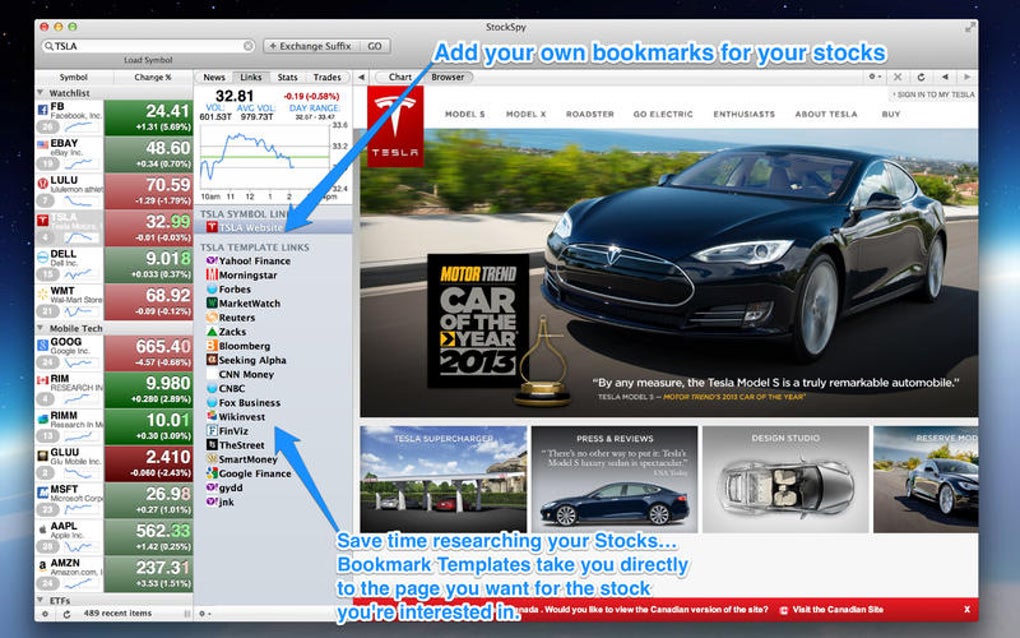
StockSpy is a dedicated macOS application that brings live market data directly to your desktop. Designed for both casual investors and seasoned traders, the program offers real‑time stock quotes, interactive charts, and a clean, Mac‑centric user interface. Since its introduction in 2016, StockSpy has attracted a modest but growing user base, thanks to its no‑cost model and focus on delivering essential financial information without the clutter of ads or unnecessary features.
The latest version, 4.1, was released on January 4 2017 and includes performance improvements, a refreshed charting engine, and support for the newest macOS releases. While the install size is not publicly disclosed, the lightweight nature of the app ensures it runs smoothly even on older Mac hardware. StockSpy’s primary audience consists of English‑speaking users who need a reliable, free tool for monitoring stocks, ETFs, and indices in real time, making it a valuable addition to any Mac user’s finance toolbox.
Key Features & Benefits
- Real‑time quotes: Stream live bid/ask prices for thousands of U.S. and international equities.
- Interactive charts: Multi‑timeframe candlestick, line, and OHLC charts with zoom, pan, and drawing tools.
- Watchlists: Create unlimited custom watchlists and reorder symbols with drag‑and‑drop.
- Price alerts: Set threshold alerts that trigger native macOS notifications.
- Portfolio tracking: Simple portfolio module to monitor holdings, gains, and losses.
- Dark mode support: Seamless integration with macOS appearance settings.
- Export options: Export data to CSV for deeper analysis in spreadsheets.
- Free & ad‑free: No subscription fees, no hidden costs, and no advertisements.
Each of these features is engineered to run efficiently on macOS, leveraging native APIs for speed and stability. The real‑time quote engine connects to reputable market data providers, ensuring that the numbers you see are accurate to the second. Charting is powered by a GPU‑accelerated renderer, which means smooth animations even when you load multiple symbols at once.
The watchlist system is highly customizable: you can assign colors, add notes, and even group symbols by sector or strategy. Alerts are delivered through the macOS Notification Center, allowing you to stay informed even when the app is minimized or hidden. Portfolio tracking is intentionally simple—ideal for users who want a quick snapshot without complex accounting features.
Overall, StockSpy balances powerful data delivery with a lightweight footprint, making it ideal for users who value speed and clarity over feature bloat.
Installation & Usage Guide
Step‑by‑step installation
- Visit the official StockSpy download page and click the Download for macOS button.
- The .dmg file will launch automatically; drag the StockSpy icon into your
/Applicationsfolder. - Open StockSpy from Launchpad or Finder. macOS may prompt you to confirm the download from an unidentified developer; click Open to proceed.
- The first launch triggers a one‑time configuration wizard where you can select your preferred market data source and set default watchlists.
- After completing the wizard, StockSpy will begin streaming live quotes. You can now add symbols, customize charts, and configure alerts.
Daily workflow tips
Once installed, most users find that a few minutes of setup pays dividends throughout the day. Begin by creating a master watchlist that contains all the symbols you track most closely—this could be a mix of individual stocks, ETFs, and major indices. Use the + Add Symbol button and type the ticker; StockSpy will auto‑complete the name.
For visual analysis, open a chart by double‑clicking a symbol; choose the time‑frame (1‑minute, 5‑minute, daily, etc.) from the toolbar and apply technical overlays such as moving averages or Bollinger Bands. If you trade on price triggers, set alerts by right‑clicking the price line and selecting Create Alert. Alerts can be set for “above,” “below,” or “crosses” a specific price, and you can choose sound, banner, or email notifications.
Finally, make use of the export feature at the bottom of the watchlist panel to back‑up your data or import it into other analysis tools. The intuitive design ensures that even users new to market software can become proficient within a single session.
Compatibility & System Requirements
StockSpy is built exclusively for macOS. It supports macOS 10.12 (Sierra) and later, including the current macOS Ventura and any subsequent releases. The app runs natively on both Intel‑based Macs and Apple Silicon (M1/M2) devices, thanks to universal binaries that automatically select the optimal architecture at launch. Minimum system specifications are modest:
- Processor: 1.4 GHz Intel Core i5 or Apple M1 chip
- Memory: 2 GB RAM (4 GB recommended for multiple watchlists)
- Disk space: < 100 MB free storage for installation and data cache
- Internet: Broadband connection (≥ 5 Mbps) for real‑time data streaming
Because StockSpy relies on live market feeds, a stable internet connection is essential. The application respects macOS privacy settings; the first run will request permission to send notifications and access the network. Users on corporate networks may need to allow outbound connections on port 443 for encrypted data transmission. Compatibility testing has shown that StockSpy integrates well with popular macOS utilities such as Spotlight (you can search for symbols) and the Notification Center (for price alerts). If you encounter any issues on newer macOS versions, the developer provides regular updates—version 4.1, released on January 4 2017, already includes patches for early Ventura compatibility.
Pros, Cons, Frequently Asked Questions & Final Verdict
Pros
- Completely free and ad‑free, offering genuine value for Mac users.
- Real‑time quotes with sub‑second latency.
- Highly responsive, GPU‑accelerated charts.
- Native macOS look‑and‑feel with dark mode support.
- Simple portfolio and watchlist management.
- Customizable price alerts via Notification Center.
Cons
- Limited to English language; no multilingual support.
- Only available on macOS; no Windows, Android, or iOS version.
- Advanced technical analysis tools (e.g., scripting, back‑testing) are absent.
- Data source options are restricted to a single provider, which may affect regional market coverage.
FAQ – Frequently Asked Questions
Is StockSpy really free, or are there hidden costs?
StockSpy is completely free. There are no subscription fees, in‑app purchases, or ad‑based revenue models. All features described in the official documentation are available to every user after download.
Can I use StockSpy on a Mac with Apple Silicon?
Yes. StockSpy ships as a universal binary, meaning it runs natively on both Intel‑based Macs and Apple Silicon (M1/M2) devices without any performance penalty.
How does StockSpy obtain its real‑time data?
The application connects to a reputable market‑data provider via secure HTTPS (port 443). The provider aggregates exchange‑level feeds and delivers them to StockSpy with sub‑second latency.
Is there any way to export my watchlist or chart data?
Yes. StockSpy includes an Export button that generates a CSV file containing your watchlist symbols, current prices, and any custom notes you have added. Chart data can also be exported as PNG images.
Will StockSpy work on macOS Ventura?
Version 4.1, released in early 2017, has been updated to maintain compatibility with newer macOS releases, including Ventura. Users on the latest OS should experience full functionality.
Final Verdict & Call to Action
StockSpy fills a niche that many Mac users have long needed: a lightweight, free, and reliable tool for monitoring live market data without the overhead of heavyweight trading platforms. Its real‑time quotes, interactive charts, and seamless macOS integration make it a solid choice for anyone from hobbyist investors to day‑traders who prefer a clean desktop experience. While the lack of Windows and mobile versions may limit cross‑device usage, the app’s performance on macOS—including Apple Silicon—is exemplary. If you are looking for a no‑cost solution that delivers essential stock information quickly and securely, StockSpy is well worth a download. Click the button below to get the latest version, set up your watchlists, and start tracking the market in real time.
StockSpy offers an impressive set of features for a free macOS‑only application. The real‑time data feed is fast, the charts feel responsive, and the native macOS design makes the app feel right at home on any Mac. Minor drawbacks like the absence of advanced technical tools and a single language interface keep it from a perfect score, but for most users the benefits far outweigh these limitations.







